
Smart Temperature Monitoring for Data Centers: Boost Efficiency and Reliability with Thermal Mapping
Thermal Monitoring in Data Centers: Smart Temperature Control for Efficiency and Uptime
In modern data centers and server rooms, precise control of temperature and humidity is essential. Data center temperature sensors ensure IT equipment operates within the safe parameters defined by ASHRAE data center guidelines. The goal is to balance sufficient cooling without energy waste or equipment risk.
Rack-Level Monitoring: Targeted Precision
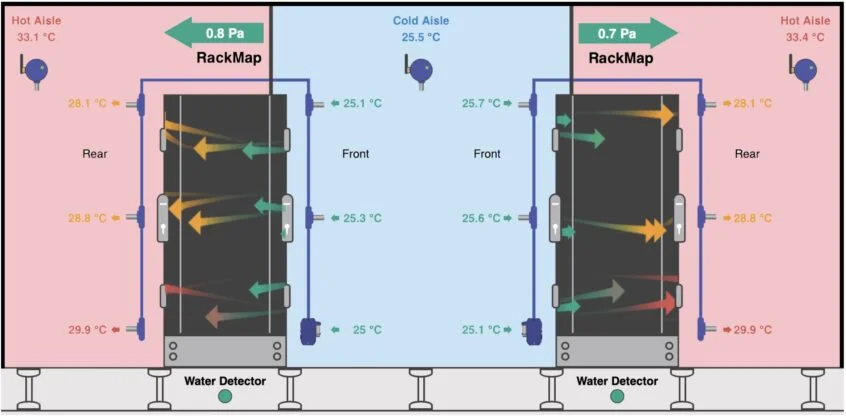
- Install rack temperature sensors at the top, middle, and bottom—ideally on every third rack.
- Also monitor exhaust temperatures to calculate ∆T, enabling thermal mapping in the data center.
- High ∆T indicates poor airflow; low ∆T may mean overcooling—both inefficient and potentially costly.
This approach detects hot and cold spots early, improves energy efficiency, and helps prevent downtime.
Room-Level Monitoring: Environmental Overview
In addition to rack-level data, server room temperature monitoring offers a broader environmental picture. Sensors should be placed away from direct sunlight, doors, or ventilation outlets to avoid inaccurate readings.
Setting Alarm Thresholds
Effective monitoring means setting meaningful alarm thresholds. According to ASHRAE data center guidelines, optimal operating temperatures range from 18°C to 27°C. Staying close to the upper limit can save energy—but requires precise control to avoid risk.
Understanding ASHRAE Recommendations
ASHRAE classifies equipment from A1 to A4 and H1. A1 is the most critical (enterprise servers), and H1 covers high-density racks with an optimal range of 18–22°C and an allowable of 5–25°C. Know the difference between recommended and allowable limits for better risk management.
Humidity Matters Too
Data center humidity sensors track both relative humidity and dew point. For classes A1–A4, ASHRAE recommends RH between 50–70% and dew point from −9°C to 15°C.
AKCP Monitoring Solutions
- AKCPro Server monitoring: centralized software for full sensor network management.
- AKCP thermal map sensors: track temperatures at multiple rack levels—front/back, top/mid/bottom—11 total points per rack.
- Room sensors combine temperature and humidity readings, with dew point calculation.
- Add-ons available for differential pressure sensors, airflow monitoring, water leakage, and power meters.
How AKCP Thermal Map Sensors Work
- Measure temperature at critical front/rear rack positions and at three vertical points.
- ∆T data identifies thermal issues and airflow bottlenecks.
- Support for up to 16 thermal maps per SPX+ with just one IP address, all integrated with AKCPro Server.
- Contactless current meters available for energy monitoring.
Benefits of Integrated Monitoring
- Proactive alerts prevent environmental faults.
- Energy savings from optimized cooling strategies.
- Reduced downtime and lower maintenance costs.
- Centralized dashboards and analytics with AKCPro Server.
FAQ – Frequently Asked Questions
1. Why monitor at multiple rack levels?
To calculate ∆T and detect airflow problems or inefficient cooling.
2. Where should room sensors be installed?
In stable areas away from sunlight, ventilation, or frequently opened doors.
3. What temperature range does ASHRAE recommend?
18–27°C is the general recommendation; for high-density racks (H1), use 18–22°C.
4. How often should threshold settings be reviewed?
Anytime hardware layout, cooling systems, or workloads change significantly.
5. Does AKCP offer sensors for airflow and pressure?
Yes, the system can be expanded with airflow monitoring and differential pressure sensors.
With data center temperature sensors and thermal mapping data center tools powered by AKCPro Server monitoring, you gain insight—not just alarms. This leads to smarter cooling, lower costs, and reliable uptime.
Was this post helpful?
Thank you for your feedback!