
Application Examples
These application cases illustrate the versatility and importance of the Didactum DIN AC Voltage Sensor in various fields where precise voltage monitoring is essential.
Data Center Monitoring
The Didactum DIN AC Voltage Sensor can be used in data centers to continuously monitor AC voltage across multiple racks. This ensures that servers and network equipment receive stable voltage and potential outages caused by voltage fluctuations are prevented.
Industrial Facility Monitoring
In production environments, the Didactum DIN AC Voltage Sensor can monitor the voltage supplied to heavy machinery. Accurate voltage measurement supports operators in maintaining optimal performance and helps prevent downtime caused by electrical issues.
Building Management Systems
The voltmeter can be integrated into building management systems to monitor voltage levels of HVAC systems, lighting, and other electrical equipment. This contributes to efficient energy use and can trigger alarms when voltage goes beyond defined threshold values.
Electrical Distributions
When installed in electrical distribution cabinets, the DIN AC Voltage Sensor provides real-time voltage monitoring for electricians and facility managers, enabling quick diagnosis of electrical problems.
Power Quality Analysis
The sensor can be used for power quality assessment and helps detect issues such as voltage sags, surges, and harmonics that may affect system performance and equipment lifespan.
Renewable Energy Systems
In solar or wind energy systems, the Didactum DIN AC Voltage Sensor can monitor the AC voltage output, ensuring that the generated energy remains within safe operating limits for connected devices.
Research and Testing
In laboratories or testing facilities, the Didactum DIN AC Voltage Sensor can be used for experiments or testing of electrical equipment, providing accurate voltage measurements for precise data acquisition.
Components
The sensor consists of the following components:
- DIN rail housing (2M) made of plastic: flammability rating UL94V-0; housing color gray; material ABS
- AC voltmeter board

Safety Instructions
Read and follow the following safety precautions carefully before working with the voltmeter.
- Only qualified electrical personnel may install this device. These tasks must only be carried out after thoroughly reading this manual.
- NEVER work alone.
- Before performing visual inspections, tests, or maintenance work on this device, all power sources must be disconnected. Always assume that all circuits are live until they are completely de-energized, tested, and properly marked. Pay special attention to the design of the power system and consider all possible voltage sources, including backfeeds.
- Always turn off power before working on the voltmeter and connected equipment.
- Always use an appropriate voltage testing device to ensure that no voltage is present.
- Wear suitable personal protective equipment (PPE) and follow safe work practices for electrical installations.
- Before closing all covers and doors, carefully inspect the work area for tools and objects that may have been left inside the device.
- Be cautious when removing or installing covers to prevent them from reaching into live areas. Avoid any handling that could cause injury.
- Proper operation of this device depends on correct handling, installation, and use. Failure to follow basic installation requirements may result in injury or damage to electrical equipment or other property.
- The voltmeter should be installed in a suitable electrical and fire-resistant enclosure.
Dimensions

Installation


1. The device is mounted on a 35 mm DIN rail.
2. Insert the wall bracket / DIN rail mount into the housing.

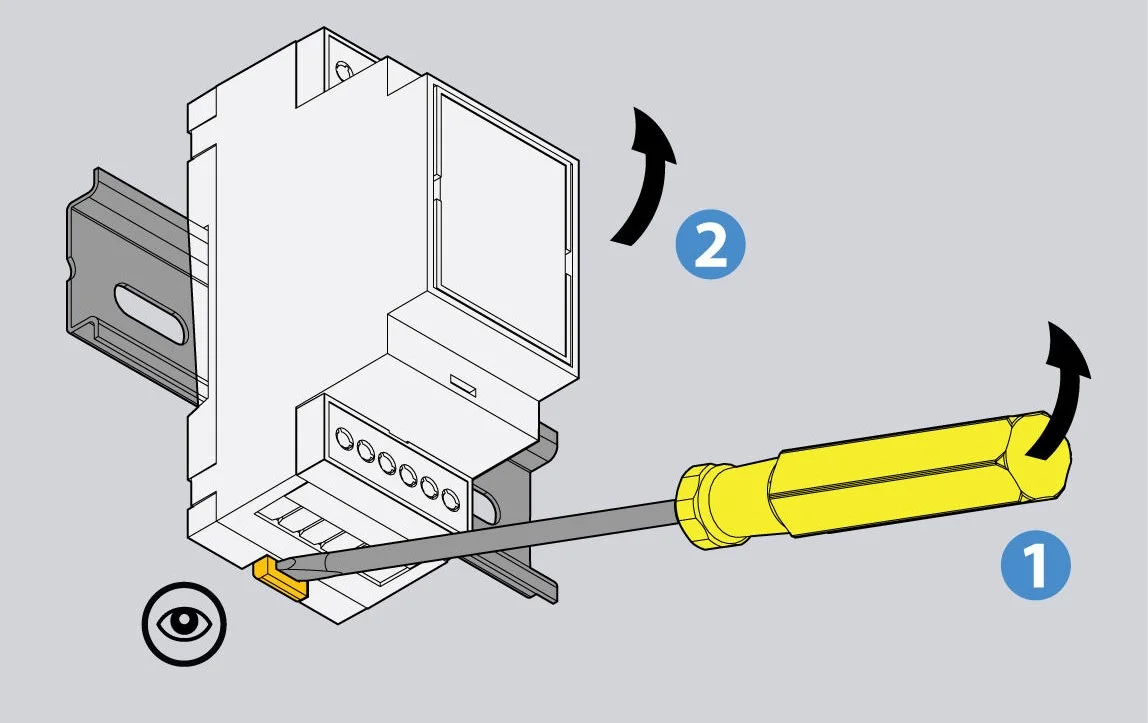
3. Place the housing onto the DIN rail and press it firmly.
4. If you need to disassemble the device, pull the wall bracket / DIN rail holder downward with a screwdriver and pull the housing outward.
Connection


- Switch OFF the mains voltage and follow the additional instructions in the “Safety Instructions” section.
- Follow the specifications of the power cable for the next step.
3. Plug in the power cables.
Make sure to follow the instructions in the “Safety Instructions” section at the beginning of the manual.

- Connect the device to the Didactum monitoring system using a 6P4C RJ11 cable (the cable is included in the delivery).
The sensor is an analog plug-and-play sensor. It is connected to an analog port of any Didactum monitoring system.
Connection Wiring / Cable Assignment
The 6P4C RJ11 cable is used to connect the device.
Converter and transceiver are installed together.
Mount the converter with M4 screws and M4 nuts. The distance between the mounting holes is 50 mm.
Mount the power transceiver with M4 screws and M4 nuts. The distance between the mounting holes is 60 mm.
Use a 4-core flat cable and the two green connectors included with the transceiver and converter to assemble the connection cable.
Frequently Asked Questions (FAQ)
Troubleshooting
Below is an overview of possible problems, their causes, and recommended solutions. If the problem persists, please contact your local Didactum sales representative.
Problem: The displayed data is inaccurate or does not match expectations.
Possible cause: Incorrect configuration values.
Solution: Check whether you are using the correct f(x) formula.
Problem: The displayed data is inaccurate or does not match expectations.
Possible cause: Incorrect voltage inputs.
Solution: Check the voltage input terminals of the power meter to ensure sufficient voltage is present.
Problem: The displayed data is inaccurate or does not match expectations.
Possible cause: The power meter is incorrectly wired.
Solution: Check that all lines are correctly connected and powered. Refer to the device’s “Wiring Diagrams.”
Problem: The sensor is not displayed in the Didactum monitoring interface.
Possible cause: Communication lines are incorrectly connected.
Solution: Check the 6P4C RJ11 communication cable.