
Use Cases
The temperature sensor is used in a wide range of industrial and commercial applications. It ensures a stable and controlled environment by accurately detecting temperature changes and transmitting them to Didactum’s monitoring systems.
- Data Centers & Server Rooms: Precise temperature monitoring to prevent overheating and ensure optimal operating conditions for servers, network components, and IT infrastructures.
- Telecommunication Facilities: Reliable control of ambient temperature in base stations and switching rooms to prevent failures caused by heat or cold.
- Industrial Automation: Protection of temperature-sensitive control systems and machinery through continuous monitoring of critical climate parameters.
- Pharmaceutical Storage: Ensuring stable temperatures in storage facilities for medicines, vaccines, and other sensitive products in accordance with regulatory requirements.
- Energy and Utility Infrastructure: Early detection of temperature increases in electrical cabinets, transformers, or technical rooms to prevent malfunctions in time.
- Warehouses and Logistics Centers: Measurement of temperature differences in large halls to improve storage conditions and reduce energy consumption.
The temperature sensor cannot operate as a standalone device and must be used in conjunction with a Didactum monitoring system. Only then is comprehensive data collection, recording, and alerting possible.
Thanks to its combination of accuracy, compatibility, and easy integration, the temperature sensor is an ideal solution for modern monitoring infrastructures where temperature management plays a crucial role.
Dimensions and technical data:

Technical Specifications:
- Type: Analog Sensor
- Dimensions: 60 × 18 × 18 mm (Length × Width × Height)
- KRJ11 6P4C telephone cable, 2 m
- Power consumption: 60 mW
- Optimal range: -10 °C to +80 °C
- Operating humidity: 0% to 95% (non-condensing)
- Maximum distance to unit: 100 m
- Accuracy: ±0.25 °C at room temperature
Connecting the sensor:
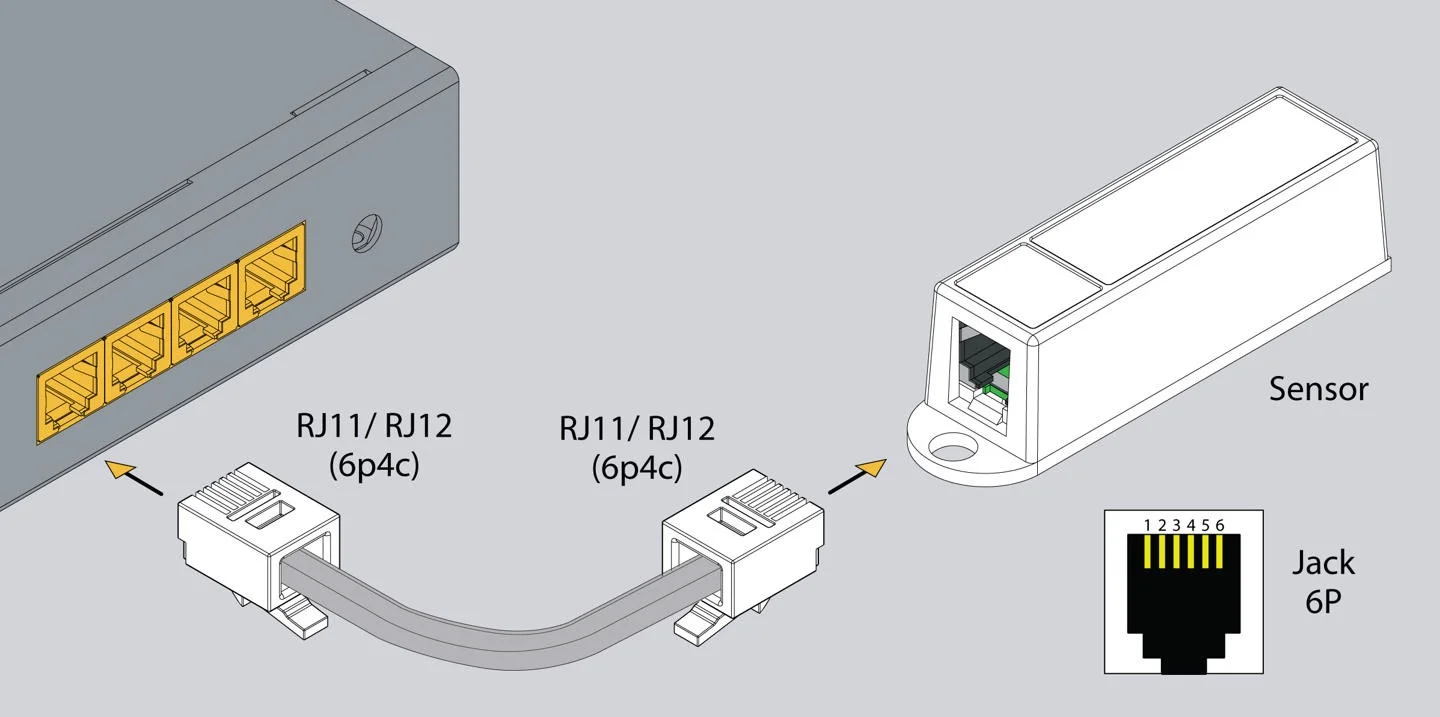
Installation:


Option 1
At the bottom of the sensor’s plastic housing, there is a round protrusion. This is used for mounting when the sensor is installed on a wall with a screw. In the present example, it is not required. If you plan to mount the device in another way, skip this step.
Cut off the round protrusion with a knife so that the underside of the plastic housing is flat.
Option 2
a) Attach the sensor base to the surface using the adhesive sticker.
or
b) Mount the sensor on the surface with a screw.
Option 3
Mount the sensor on the surface using a bracket. The bracket and the sensor can be attached either with adhesive stickers or with screws and nuts.
Connection to the monitoring unit:

Furnishings:


Settings Tab
To configure a sensor, go to "Main Menu" >> "System Tree" and click on the sensor element in the tree. A modal window with the sensor properties will open.
Change the required settings and click "OK" or "Apply" at the bottom of the window. There you can set, among other things, the sensor name, sensor type, connection point, and threshold values.
This configuration allows the sensor to be adapted to specific requirements and ensures precise monitoring. The value settings, for example, affect the system’s alarm notifications.
In the image above, the "Current Value" is 41.0 and is represented by the small triangle.
This triangle is currently green because it is within the "Normal" range.
Therefore, the sensor indicates that the "Current State" is "Normal".
This value is used by the system’s "Logic Circuits" menu to notify the administrator or trigger an action.
Example:
Why is hysteresis needed?
Suppose we have a temperature sensor with a threshold value of 25.5 °C defining the transition between normal and alarm states. When the temperature is just below 25.5 °C, the sensor is in the normal state; if it rises slightly above, the state changes to warning. However, if the temperature fluctuates around this threshold by 0.1 – 0.3 °C, this results in many unnecessary state changes and notifications.
Hysteresis provides stability in this case. When the hysteresis type “Time” is selected, the system waits for a defined period before confirming a state change. With the type “Value”, a state change is only recognized when the temperature deviates by more than the specified hysteresis value.
This prevents frequent switching operations and reduces false alarms, improving the lifespan of both sensors and connected systems. Hysteresis is an essential function in temperature monitoring to ensure reliable and stable alerting.
Cable assignment:

In case of strong electromagnetic interference, the use of a 3-pair CAN FTP cable for the sensor cable connection is recommended.
The color coding for this telephone cable is as follows: 1 - Orange, 2 - White-Blue, 3 - Blue, 4 - White-Orange. Both cable ends have the same color pattern and the wire assignment is identical.
An FTP cable (Foiled Twisted Pair) protects the signals against electromagnetic interference through a foil shield, which is particularly essential in industrial environments with high interference potential. The twisted pairs further help minimize noise signals. Correct color and polarity alignment are important to ensure error-free and stable data transmission.
This measure increases the reliability of the sensor signal and protects against data loss or false readings caused by external interference. In environments with high electromagnetic exposure, such a shielded cable is therefore indispensable.