CAN Combination Sensor for Smoke, Temperature & Humidity




€169.00
Available, delivery time: 1-2 weeks
Early fire detection in the CAN bus network
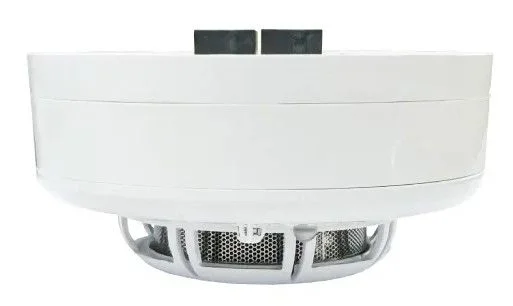
The Didactum CAN combination sensor for smoke, temperature, and humidity combines a highly sensitive photoelectric smoke detector with precise temperature and humidity measurement in one device. Thanks to its high smoke sensitivity, it detects even low smoke concentrations and is therefore suitable as an early warning system in critical environments such as data centers, server rooms, and production facilities.
Each measured parameter — smoke, temperature, and humidity — is displayed as a separate element in the Didactum web interface. This makes it possible to define individual threshold values and trigger events such as notifications, alarms, or automated system responses.
As a robust CAN bus sensor, it supports daisy chaining with other CAN devices. Depending on the system configuration, 10 to 32 CAN units can be connected in a single CAN bus chain, enabling high scalability.
Sensor structure at a glance
The sensor has five key elements that are relevant for installation, wiring, and status checks.
Operating LEDs
The white LED flashes every few seconds during normal operation and indicates that the sensor is ready for use. The red LED signals alarm mode, for example when smoke is detected.
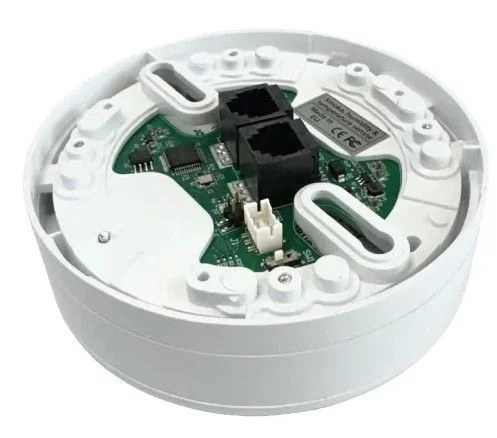
CAN bus ports
Two CAN bus connectors on the rear side — the numbering does not matter, as either port can be used for both directions of the chain.
Configuration LEDs
The red LED indicates that the sensor is connected to the system. The blue LED lights up as soon as CAN configuration has started.
Temperature and humidity sensor
Continuously measures relative humidity and ambient temperature at the installation site.
Termination switch
Must be set to "ON" when the sensor is the last device in the CAN bus chain.
The sensor cannot operate on its own — it must always be used together with a Didactum or Vutlan monitoring system.
Installation as a ceiling detector
As a classic smoke detector, the sensor is mounted on the ceiling or in the server cabinet. The included metal bracket makes safe and standards-compliant installation easier.
- Orientation: The sensor head must always face downward. Only in this position is reliable smoke detection ensured.
- Ventilation: The sensor must be sufficiently ventilated — the ventilation slots must not be covered or obstructed.
- Mounting height: The maximum mounting height is 6 meters.
- Mounting: The sensor head is detached from the base, then the base is secured to the metal bracket using the supplied M4×10 screws. The bracket itself is fixed to the cabinet frame with 4.8×19 mm screws. The sensor head is then reattached and snapped into place.
- Before commissioning: The red protective cap on the sensor must be removed before operation.
Test the sensor and avoid false alarms
The smoke sensor can be tested easily and without an open flame.
To test it, a standard PRF alarm tester spray is sprayed directly onto the sensor. The sensor then switches to alarm mode and the red operating LED lights up. After a short time — depending on the amount sprayed — the sensor automatically returns to normal operation.
Avoid false alarms: High-frequency noises and dust deposits on the sensor can trigger false alarms. When choosing the installation location, make sure to protect the sensor from dust and interfering sounds.
Set the TR switch correctly
The TR switch ensures the correct termination of the CAN bus chain and must be set differently depending on the sensor’s position within the chain.
- Last sensor in the chain: The TR switch on the last sensor in the CAN bus chain must always be set to "ON".
- All other sensors: All other sensors or devices in the chain — whether at the beginning or in the middle — must be set to "OFF".
After connecting the sensors to the CAN bus, the red configuration LED on the rear side initially lights up. You then start the CAN bus polling via the web interface under "CAN Configuration". Once the sensors have been detected, the blue configuration LED also lights up, and the white operating LED on the front starts flashing every second during normal operation.
Measurement accuracy and operating range
In addition to smoke detection, the sensor simultaneously measures temperature and humidity with its own specified accuracy.
The smoke sensor works on the photoelectric principle and reliably detects even low smoke concentrations. Power consumption is around 100–120 mW, and the maximum distance to the monitoring unit is 225 m.
Areas of use for the sensor
The Didactum CAN combination sensor for smoke, temperature, and humidity is suitable for many applications where fire detection and climate monitoring are both required.
- Data centers: Monitoring smoke and heat protects valuable hardware and reduces downtime caused by fire incidents
- Server rooms: Combining smoke, temperature, and humidity monitoring helps prevent outages and protects critical IT infrastructure
- Industrial facilities: Early detection of smoke emissions from machines or production processes minimizes safety risks
- Warehousing and logistics: Protect sensitive goods such as food, pharmaceuticals, or artwork through continuous environmental monitoring
- Building management: Integrate into existing building management systems (BMS) for centralized control of safety and room climate
- Educational facilities: Use in classrooms and common areas to improve fire protection with automatic alerting
- Energy facilities: Protect against overheating and moisture damage in power plants and substations for maximum operational safety
- Telecommunications sites: Protect remote radio stations from equipment damage caused by smoke, overheating, or humidity
Functions in the web interface
Logic schemes
Automated actions when threshold values are exceeded, such as activating alarms or sending notifications.
Dashboard view
Individually configurable overview with multigraphs, gauges, and dial controls.
5 alarm thresholds
Individually adjustable for each parameter: Low Alarm, Low Warning, Normal, High Warning, High Alarm.
Long-term logging
SD card logging up to 500 GB for trend analysis and documentation requirements.
Separate elements
Smoke, temperature, and humidity are shown as independent, individually configurable elements.
Modularity
Up to 32 CAN sensors and additional CAN devices can be operated in a chain.
Connecting CAN sensors
Up to 32 CAN units can be connected in a CAN bus chain, making the Didactum system highly modular. Up to 10 smoke combination sensors of this type can be connected in series to a single CAN port on the main module — using a new RJ11 cable from a free input of the already connected sensor to the next sensor in the chain.
An additional CAN power supply (12V/1A) is only required if the number of CAN devices in the chain exceeds 12 units. The maximum distance to the monitoring unit is 225 m.
What is included in the package
Please check the package contents for completeness upon receipt and report any missing or damaged items to your supplier immediately. In the event of transport damage, please contact the responsible delivery service directly.
- CAN combination sensor for smoke, temperature, and humidity1 piece
- RJ11/RJ12 6P4C cable1 piece
- Metal mounting plate (bracket)1 piece
- M4 x 10 mm screwsincluded
- 4.8 x 19 mm screwsincluded
Why this sensor is the right choice
Three parameters, one sensor
Smoke, temperature, and humidity measured simultaneously in one compact ceiling detector.
High smoke sensitivity
Photoelectric measuring principle detects even low smoke concentrations at an early stage.
Scalable via daisy chain
Up to 10 sensors per CAN port, up to 32 CAN units combinable in one chain.
Dual status LEDs
Separate operating and configuration LEDs for quick local status checks.
Easy function test
Can be tested at any time with standard alarm tester spray.
Mounting included
Metal bracket and mounting screws are already included.
Wide humidity range
Designed for 5–95 % RH, non-condensing.
Made in EU
Developed and manufactured in the European Union.
Frequently asked questions
How do I set the TR switch correctly?
If the sensor is the last device in the CAN bus chain, the TR switch must be set to "ON". All other sensors in the chain — at the beginning or in the middle — must be set to "OFF".
What do the different LEDs on the sensor mean?
The sensor has two pairs of LEDs: the operating LEDs on the front show a white light flashing every few seconds during normal operation; in the event of an alarm, the red LED lights up instead. The configuration LEDs on the rear show the connection to the system with a red LED and the start of CAN configuration with a blue LED.
How many sensors can be combined in a CAN bus chain?
Up to 10 combination sensors of this type can be connected in series on a single CAN port. In total, depending on the system configuration, 10 to 32 CAN devices can be connected in a single chain. An additional CAN power supply (12V/1A) is only required if the number of CAN devices in the chain exceeds 12 units.
What should be considered during installation?
The sensor head must always face downward; otherwise, reliable smoke detection cannot be guaranteed. The ventilation slots must not be covered, and the maximum mounting height is 6 meters. The red protective cap must also be removed before commissioning.
How can I test the sensor?
The sensor can be tested with standard PRF alarm tester spray: spray it directly onto the sensor, whereupon it switches to alarm mode and the red operating LED lights up. After a short time, the sensor automatically returns to normal operation. Avoid dust and high-frequency noises at the installation site, as these can trigger false alarms.
What measurement accuracy does the sensor have for temperature and humidity?
Temperature accuracy is ±0.5 °C, and humidity accuracy is ±3 % RH. The sensor covers an operating range of −10 °C to +80 °C and 5 to 95 % relative humidity (non-condensing).
Which connections does the sensor have?
The sensor has two CAN bus connections (RJ11/RJ12 6P4C) on the rear side. The numbering of the ports does not matter — either port can be used for both directions of the CAN bus chain.
Questions about the CAN combination sensor for smoke, temperature, and humidity?
Our support team in Germany provides free advice on selection, installation, and configuration.
Suitable monitoring devices:


Suitable extension units:


Manufacturer information:
Didactum® Security GmbH
Im Mühlenfeld 4
48163 Münster
Deutschland
Fon:
(+49) 250 19 71 63 54 / (+49) 171 33 11 577
Email: info@didactum-security.de

