Access Sensor



€65.00
Available, delivery time: 1-2 weeks
Reliable access control for doors and windows
The Didactum door contact sensor monitors the status of doors, windows, or server cabinets (open or closed) and is therefore a key component of any access control system. It connects to an analog port (A1–A8) of a Didactum Monitoring System, is ready to use immediately, and supports daisy chaining of multiple sensors, making it easy and scalable to monitor larger installations with multiple access points.
Whether it is a server room, archive, or executive office: the door contact sensor reports every unauthorized opening of an access point to the monitoring system in real time and can be combined with additional components such as a siren to trigger an immediate alarm in an emergency.
Two-component principle: reed contact and magnet
The door contact sensor consists of two separate components that work together to detect status changes.
Sensor unit (reed contact)
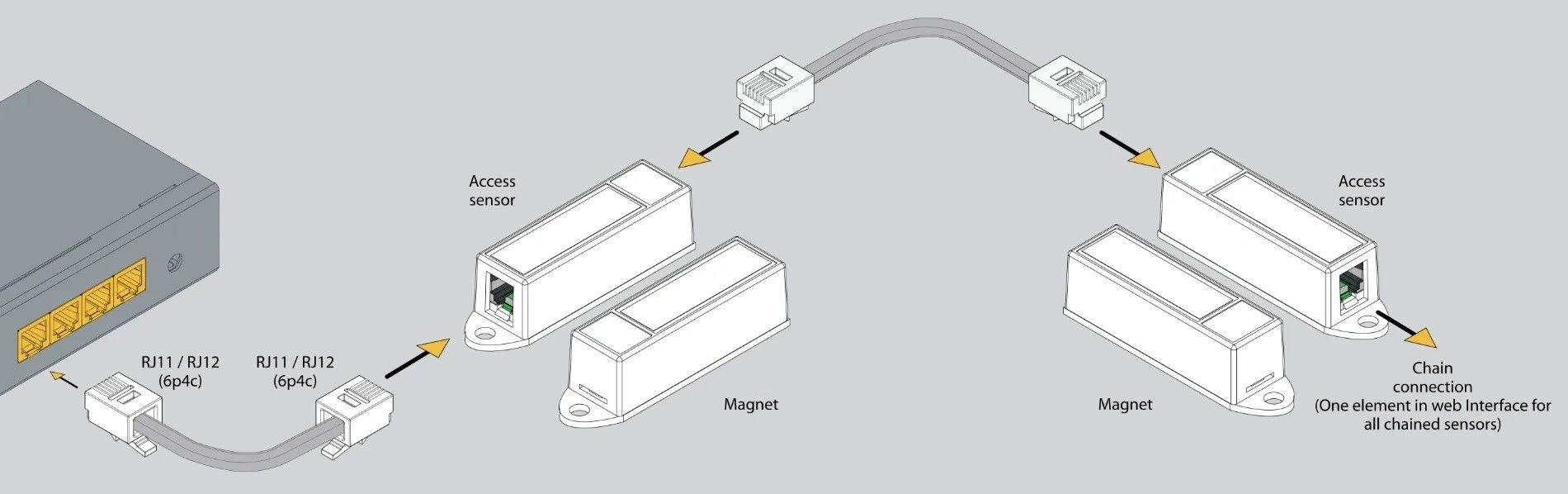
Slender plastic housing with an integrated magnetic switch (reed contact) that connects via an RJ11/RJ12 cable (6P4C) to an analog port of the monitoring system. It is mounted on the fixed frame of the door, window, or rack cabinet.
Counterpart (magnet)
Small permanent magnet without its own electronics or wiring, attached to the moving part, meaning the door or window itself.
As long as the magnet is in close proximity to the sensor unit, the internal reed contact closes and reports the status "closed." When the magnet moves away as the door or window opens, the reed contact opens and the sensor reports "open." Because the magnet operates completely passively and requires no power supply, the entire design is especially low-maintenance and durable.
How the sensor detects door status
The reed contact in the sensor unit responds to the magnetic field of the associated magnet. When the door is closed, magnet and sensor are close together, the contact closes, and the monitoring system shows the status "Normal" (closed). When the door opens, the magnet moves away from the sensor, the contact opens, and the system reports "Alarm" (open).
If needed, the logic can be reversed directly in the web interface, so the sensor is also suitable for applications where an open state is normal and a closed state should trigger an alarm.
Practical example: The door contact sensor is mounted on the frame of a server cabinet, with the magnet attached to the cabinet door. If an employee opens the cabinet door without authorization outside business hours, the sensor immediately reports the status "open" to the monitoring system, which then automatically sends an email to security personnel and optionally triggers a connected siren.
Connection and daisy chaining of multiple sensors
The door contact sensor is connected via a standard RJ11/RJ12 sensor cable (6P4C) to one of the analog ports (A1 to A8) of a Didactum Monitoring System and is automatically detected there using plug-and-play. Thanks to the input and output ports (both RJ11/RJ12), multiple door contact sensors can be connected in series using daisy-chain wiring. All sensors in a chain appear as a single shared element in the web interface; if any sensor in the chain is triggered, this is reported as one combined status change.
Important note: A maximum of 10 door contact sensors can be connected in series. The total cable length must not exceed 150 meters.
Mounting on doors, windows, or rack cabinets
The sensor unit is mounted on the fixed frame, while the magnet is placed directly opposite on the moving door leaf, window sash, or rack cabinet door.
Depending on the construction of the access point, the sensor can be attached with the included screws, adhesive strips, or the supplied mounting bracket. The bracket is especially suitable for clean installation in 19-inch IT racks and control cabinets. It is important that the magnet and sensor are precisely aligned with each other when the door or window is closed so that the reed contact closes reliably.
Monitor more access points
For larger installations with numerous access points, the number of connectable door contact sensors and the overall system range can be increased using a Didactum sensor expansion unit (8× analog, connected to the monitoring system via CAN bus). This makes it possible to centrally and comprehensively monitor large buildings, multiple floors, or many server cabinets without replacing the central unit.
Applications for the door contact sensor
- Server room security: Monitoring all doors and server cabinets with real-time status updates and logging of door openings.
- Access control in data centers: Monitoring all access points, including documentation of access events.
- Securing archives and storage rooms: Monitoring doors outside business hours with automatic alerting.
- Building automation: Linking with air conditioning or lighting control when opened or closed.
- Protection of sensitive office areas: Securing development departments or executive offices.
- Window and emergency exit monitoring: Early detection of unauthorized open windows or emergency exits.
Performance data at a glance
What is included in the package
Please check the contents for completeness upon receipt and report any missing or damaged parts to your supplier immediately.
- Door contact sensor (reed contact) with magnet1 each
- RJ11 sensor cable, 6P4C, 2 m1 piece
- Mounting bracket1 piece
- Mounting screw1 piece
- Screws, nuts & washers2 each
- Adhesive strips for mounting2 pieces
Why this door contact sensor is the right choice
Reliable measurement principle
Proven reed contact with passive magnet, low-maintenance and durable.
Daisy-chain capable
Up to 10 sensors in one chain, shown together as one element in the system.
Plug and play
Simple connection to any analog port of the monitoring system.
Flexible logic
Open/closed state can be reversed in the web interface.
Long range
Up to 150 m total length to the monitoring or expansion unit.
Flexible installation
Bracket, screws, and adhesive strips for doors, windows, and IT racks.
Scalable
Expandable via additional sensor expansion units for large installations.
Made in EU
Developed and manufactured in the European Union.
More about the door contact sensor
Additional information on the door contact sensor
Detailed guide to connection, configuration, and operation of the door contact sensor in Didactum monitoring systems.
To the knowledge base →Frequently asked questions
What parts does the door contact sensor consist of?
The door contact sensor consists of two parts: a sensor unit with an integrated reed contact, connected via an RJ11/RJ12 cable to an analog port of the monitoring system, and a passive magnet without its own wiring, mounted on the moving part of the door or window.
How many sensors can be connected in series?
A maximum of 10 door contact sensors can be connected in a daisy-chain series. The total cable length must not exceed 150 meters. All sensors in a chain appear in the web interface as one shared element.
Can I define whether "open" or "closed" is the alarm state?
Yes. The sensor logic can be reversed directly in the monitoring system's web interface, allowing either an open or closed state to be defined as the alarm condition depending on the use case.
How is the sensor installed?
The sensor unit is mounted on the fixed frame, while the magnet is placed directly opposite on the moving door leaf or window sash. Depending on the installation, screws, adhesive strips, or a mounting bracket are available, which are especially suitable for installation in IT racks.
Can the sensor also be used for server cabinet doors?
Yes, in addition to doors and windows, the door contact sensor is explicitly suitable for access control of server cabinets and rack doors and can be cleanly installed in 19-inch racks thanks to the included bracket.
How many door contact sensors can I connect to one monitoring system in total?
The number depends on the available analog ports of the monitoring system and the ability to connect up to 10 sensors per chain in series. If more connections are needed, the total can be expanded using a Didactum sensor expansion unit with additional analog ports.
Questions about the door contact sensor?
Our support team in Germany will advise you free of charge on selection, installation, and configuration.
Didactum Door Contact Sensor
Function
- Analog access sensor for monitoring doors and windows (open/closed)
- Consists of a magnet and sensor unit for reliable state detection
- Connection to analog ports (A1...A8) of a Didactum Monitoring System
- Cascadable (daisy chain) for multiple sensors in series
- Up to 10 sensors per chain possible (displayed as one element in the system)
- Expandable via expansion unit for larger installations
Sensor Technology
- Sensor type: Analog
- Measurement principle: Magnetic contact (open / closed)
- Cascading: Yes (up to 10 sensors)
Connections
- Input: RJ11 / RJ12 (6P4C)
- Output: RJ11 / RJ12 (6P4C)
- Maximum distance: up to 150 m to the central unit
Environmental Conditions
- Operating temperature: -10 °C to +80 °C
- Humidity: 5 % to 95 % (non-condensing)
Mechanical Data
- Dimensions: 600 × 18 × 18 mm
- Weight: 106 g
- Mounting: Includes bracket, screws, and adhesive strips
- Application: Ideal for IT racks, cabinets, doors, and windows
Electrical Data
- Power consumption: 60 mW
General
- Manufacture: EU
- HS code: 8531 10 300
Can be used with monitoring unit:


Can be used with extension unit:


Manufacturer information:
Didactum® Security GmbH
Im Mühlenfeld 4
48163 Münster
Deutschland
Fon:
(+49) 250 19 71 63 54 / (+49) 171 33 11 577
Email: info@didactum-security.de

