


Didactum Knowledge Base · Didactum Devices
Monitoring System 500T
Overview of the device, connections, available power supply variants, and technical specifications of the Didactum Monitoring System 500T – the 19″ 1U monitoring solution with Gigabit Ethernet, 16 dry contact inputs, redundant power supply, and optional LTE modem for data centers, server rooms, and critical infrastructure.

What makes the 500T stand out
Self-contained 19″ 1U monitoring and control unit with no moving parts, for data centers and critical infrastructure.
Built for the 19″ rack
Solid 1U metal enclosure with no fans or moving parts, for maximum lifespan and reliability.
8 analog ports + CAN bus
8 RJ12 sensor ports directly on the device, expandable via CAN bus (up to 305 m) to as many as 64 sensors.
Real-time alerting
By email, SMS, SNMP trap, syslog, web-to-SMS, or push notification, including SMS remote control.
Stand-alone & web-based
Operates without an external server or additional software, and integrates with Zabbix, PRTG, Nagios, and Check_MK.
I/O controller
16 dry contact inputs plus 2 NC/NO/COM relays (240V/10A) and 2 relays (12V/0.25A) for controlling doors, fans, generators, and UPS units.
Scalable
Up to 1000 elements – notifications, triggers, timers, logic schemes, and sensors.
Redundant power supply
Up to three equivalent power supply lines (230V AC, 24–48V DC, battery reservation), depending on the variant.
LTE, Modbus & battery expansion
Optional LTE modem, Modbus/RTU or OSDPv2 expansion, and an optional battery backup.
Made in the EU
Rugged metal enclosure, German support included, regular firmware updates.
Typical use cases
- Temperature, humidity, and leak monitoring under raised floors in data centers
- UPS and power monitoring with automatic switchover to redundant power supply
- I/O control of air conditioning units, fans, backup generators, and circuit breakers
- Access and security monitoring for server racks and equipment rooms
- Early smoke and gas detection in data centers and laboratories
- Building management: centrally monitoring HVAC, fire alarm, and access control systems
- Telecommunications sites and unmanned remote stations with LTE remote access
- Video surveillance via USB or IP camera combined with sensor alarms
Connections & Controls
All 25 ports, buttons, and slots on the front and rear of the 500T, along with the complete wiring diagram, at a glance.
As a 19″ 1U rack device, the 500T spreads its connections across both sides of the metal enclosure: on the front are the 8 analog sensor ports, CAN port, LTE modem slot, USB, LAN, restart button, and the system LEDs. On the rear sit the built-in temperature sensor, 16 dry contact inputs, the expansion slot, the chassis ground, the battery expansion slot, the power inputs (230V AC and/or 24–48V DC, depending on the variant), the two NC/NO/COM relays, the 12V outputs, the reset button, the DIP switch, and the SD card slot.
Connections 1–11 (front)

Front: analog sensor ports, LTE modem slot, CAN, USB, restart button, and system LEDs.
19″ rack mounting brackets
2× mounting brackets for fixing into a 19″ 1U rack slot.
Label field
Blank area for a label, e.g. to mark the device's IP address.
Analog sensors A1–A8
8× RJ12 connections for analog sensors with automatic detection (AutoSense).
LAN port
Ethernet 10/100/1000 Base-T connection. Orange LED shows network traffic, green LED shows connection status (steady green = connected, blinking = connecting or system startup).
LTE modem slot
Slot for an optional, separately available LTE modem for remote monitoring without a fixed IP network.
CAN (CAN devices)
Digital RJ12 connection for CAN sensors, expansions, and devices on the CAN bus, cascadable. Green LED shows bus status – slow blinking: no connection, fast blinking: configuration in progress, steady light: connected to CAN devices.
USB
Micro-USB port – for USB camera capture as well as USB flash drives for system logs and system recovery.
Restart button
Hold for 2 seconds and release to restart the system.
Status LEDs (Activity, Error, Alarm)
Activity (green) shows system status (operation: 2 Hz blinking, successful update: 4 Hz blinking). Error (red) indicates errors and data traffic. Alarm is freely programmable via the interface.
Temperature sensor
Built-in sensor with an accuracy of ±1 °C.
Status LEDs E1/E2, R1/R2, CAN
E1/E2 show the status of the 12V/0.25A outputs, R1/R2 the status of the two NC/NO/COM relays, and CAN the bus status.
Connections 12–25 (rear)

Rear: dry contact inputs, expansion slot, power inputs, relays, and outputs.
Dry contact inputs 1–16
16 digital inputs for door, water, or other contact sensors.
Expansion slot
Housing for the optional Modbus/RTU or OSDPv2 reader expansion. Only one of the two expansions can be installed at a time.
Chassis ground
M4 thread. Increases immunity to conducted and radiated RF interference. Connection should be made by a qualified electrician.
Battery expansion slot
Housing for the optional VT-ACCU (rechargeable) or VT-BAT (9V block battery) battery backup, to bridge power outages.
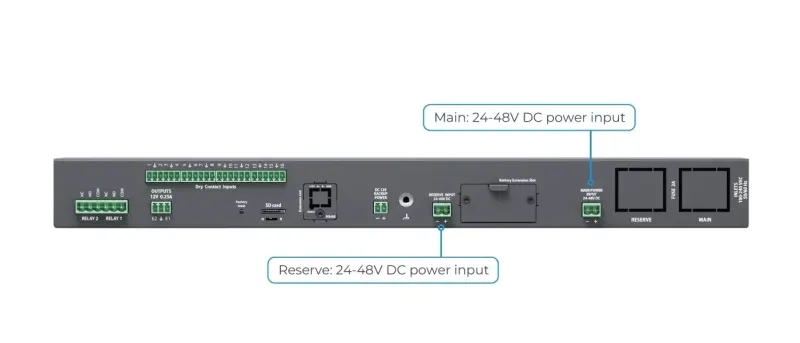
Reserve power input
Second power input, 100–240V AC, 50/60 Hz, 2A fuse (5×20 mm, type C14) – depending on the ordered variant.
Main power input
Power input, 100–240V AC, 50/60 Hz, 2A fuse (5×20 mm, type C14).
Relay 1 / Relay 2 (NC/NO/COM)
Dry-contact power relay terminals, 240V / 10A, with their own status LEDs (R1/R2) on the front panel.
Outputs 12V / 0.25A
Terminal blocks (electronic relay) for each output, with their own status LEDs (E1/E2) on the front panel.
Reset button (factory settings)
Hold for more than 5 seconds – the Error LED starts blinking to indicate the recovery process has begun. After 20–60 seconds the device is reset and reachable again once the Activity LED blinks.
DIP switch (N–R)
Normal mode (N): switch always set to the left. Recovery (R): switch set to the right, loads the clean system image from the SD card.
SD card
MicroSD card slot with ejector – for data storage or system recovery.
DC 12V backup power
Third, equivalent power supply line for the device.
Reserve input 24–48V DC
Second DC power input, 24–48V DC (18–72V DC), 5.08 mm pitch, 2EDGK connector – depending on the ordered variant.
Main input 24–48V DC
Optional main DC power input – depending on the ordered variant.
Wiring diagram
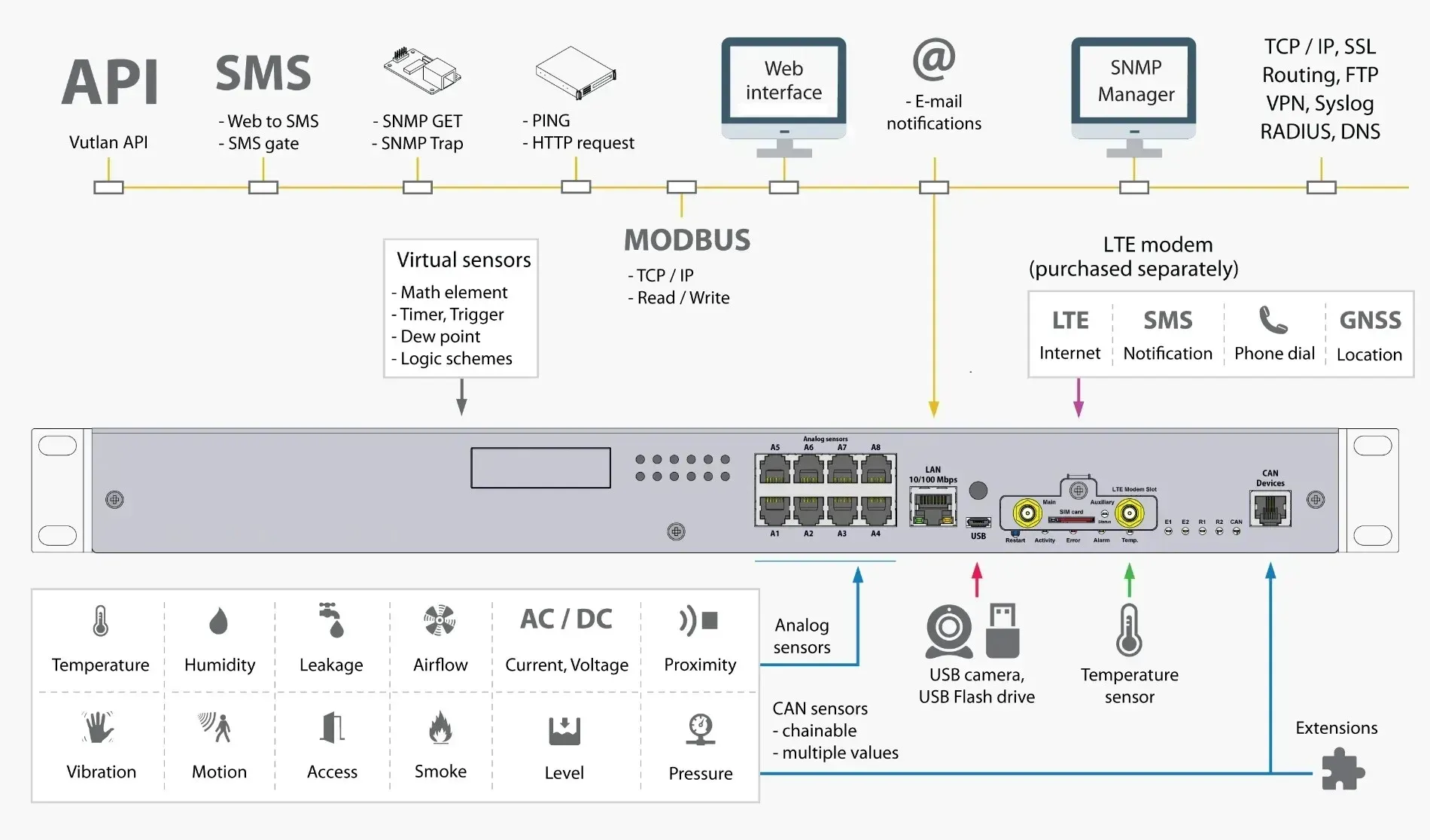
Complete wiring diagram of all ports, relays, and expansion options of the 500T at a glance.
Dimensions in detail
Technical Specifications
Device management
| Device management | Web, SNMP |
|---|---|
| Sensor access | Three-tier login (user management) |
Interface
| LAN | Ethernet 10 / 100 / 1000 Mbit |
|---|---|
| Operating system | Linux v.6.2 |
| Interface | Any browser |
| Memory (RAM) | 128 MB |
| CPU speed | 720 MHz (dual-core Cortex-A7) |
| Total CPU cores | 2 |
| Clock | Built-in clock |
| Timer | Built-in watchdog |
| USB | 1× Micro-USB 2.0 |
Sensors & Logic
| Max. number of sensors | 130 (physical sensors, dry contacts, relays) |
|---|---|
| Max. number of elements | 1000 (notifications, triggers, timers, logic, sensors, etc.) |
| Virtual functions | Ping monitoring, SNMP GET, logic schemes, triggers, timers, virtual calculations (math element), up to 4 IP cameras |
Network / Protocol support
| LTE gateway mode | Yes, via optional LTE modem |
|---|---|
| LTE access mode | Yes, via optional LTE modem (incl. SMS/web-to-SMS) |
| Network protocols | DHCP, HTTP, HTTPS, SNMP (v1/v2c/v3), SMTP, FTP, Syslog, TLS, RADIUS, DynDNS |
| Modbus RTU | Optional, with OSDPv2 RS485 expansion module |
| Modbus TCP/IP | Yes |
| VPN (secure data transmission) | Supported (incl. OpenVPN/SSL) |
Notifications
| Alarm types | Email, FTP, Syslog, SMTP, SNMP traps, web-to-SMS, push |
|---|---|
| Max. email recipients | 20 |
| Max. SMS recipients | 20 |
Power supply
| Energy efficiency (EU Energy Level) | Grade A |
|---|---|
| Power input (230V AC) | One or two inputs, depending on variant |
| Power input (24–48V DC) | One or two inputs, depending on variant |
| Power input (12V DC) | Additional third supply line (backup) |
| Redundant power supply | Automatic switchover to the line with the highest voltage; optional battery backup (power backup module) |
| Min. power consumption | 1 W |
| Max. power consumption | 10 W |
Inputs/Outputs
| Analog port | 8 built-in ports (RJ12), expandable via CAN bus |
|---|---|
| CAN port | 1 port, up to 32 devices |
| Dry contact inputs | 16 |
| Relay outputs (240V / 10A) | 2 (NC/NO/COM) |
| Relay outputs (12V / 0.25A) | 2 |
Video support
| USB cameras | 1 |
|---|---|
| IP cameras | up to 4 (display only) |
Storage & Logs
| MicroSD slot | For data storage and system recovery |
|---|---|
| USB export | Logs, sensor data, settings |
| Log delivery | Syslog, FTP, email |
Built-in sensors
| Temperature sensor | Built-in, ±1 °C accuracy |
|---|
Environmental conditions
| Operating temperature | -10 to +70 °C |
|---|---|
| Storage temperature | -25 to +85 °C |
| Operating humidity | 0 to 90% (non-condensing) |
Mechanics & Housing
| Installation | 19″ 1U rack mounting |
|---|---|
| Housing material | Sheet steel |
| Dimensions (L × W × H) | 440 × 44 × 90 mm |
| Weight | approx. 1.5–2.2 kg (variant-dependent) |
| Reset/recovery switch | Present |
Frequently Asked Questions
What is the Didactum Monitoring System 500T and what is it used for?
The Didactum Monitoring System 500T is a self-contained 19″ 1U monitoring and control unit for data centers, server rooms, and critical infrastructure. It monitors environmental parameters such as temperature, humidity, voltage, leaks, smoke, and airflow, while also functioning as an I/O controller for controlling doors, fans, generators, UPS systems, and circuit breakers – entirely without an external server or additional software.
What power supply variants are available and how do they differ?
The 500T is available in five variants: 1× 230V AC, 2× 230V AC redundant, 1× 24–48V DC, 2× 24–48V DC redundant, and 230V AC + 24–48V DC redundant. With the redundant variants, the device automatically switches to the line with the highest applied voltage, so the failure of one line doesn't interrupt operation. All variants can also optionally be fitted with a battery backup.
Which sensors can be connected to the system?
The Monitoring System 500T has 8 analog RJ12 sensor ports directly on the device as well as 16 dry contact inputs, and can be expanded via the CAN bus (up to 305 m of cable length) with additional CAN expansion units, allowing up to 64 analog sensors to be monitored simultaneously in total. Supported sensor types include temperature, humidity, smoke, water, vibration, door, and voltage sensors, among others.
How does the 500T differ from the smaller Didactum systems (100T, 300T)?
The 500T is designed for 19″ rack mounting (1U) rather than desktop or DIN-rail installation, and offers significantly greater capacity than the 100T or 300T, with 8 analog ports, 16 dry contact inputs, 2 power relays (240V/10A), and up to 1000 elements. It is also the only device in the Didactum series with factory-selectable, redundant power supply variants and an optional battery backup.
How are alarms and notifications sent?
The system offers various alerting methods: email notifications to up to 20 recipients, SMS or web-to-SMS (via optional LTE modem), SNMP traps for network management systems, syslog messages, FTP transfer, and push notifications. In the event of a network outage, the 500T can communicate over the mobile network and even receive commands by SMS, for example to switch a relay or restart the system.
Can the system be integrated into existing IT infrastructures?
Yes. The system supports SNMP v1/v2c/v3, Modbus TCP/IP, and, via expansion modules, Modbus RTU and OSDPv2, and can be integrated into common monitoring platforms such as Nagios, PRTG, Zabbix, or Check_MK. It connects via Gigabit Ethernet and can be managed both through the web interface and via network management tools.
What do the expansion slot and battery slot do?
The expansion slot accepts either a Modbus/RTU or an OSDPv2 reader expansion – only one of the two modules can be installed at a time. The separate battery expansion slot accepts the optional battery (rechargeable), which temporarily keeps the device powered in the event of a complete failure of all power inputs.
Questions about the 500T?
Our support team in Germany provides free advice on choosing the right variant, setup, and sensors.
Scope of delivery
- 1 x Didactum 500T monitoring device
- 1 x OTG USB-C cable
- 1 x UTP 3m Ethernet cable
- 1 x Micro USB-C OTG adapter cable
- 2 x 19" rack mounts
- 6 x M3 x 8mm Phillips flat head screws
- 1 x terminal 6P 5, 08mm
- 1 x terminal 3P 3.81 mm
- 4 x terminal 6P 3.5 mm
- 15 x connector plugs 2P 3.81 mm
- 4 x self-adhesive rubber feet
- 1 x quick start guide
Manufacturer information:
Didactum® Security GmbH
Im Mühlenfeld 4
48163 Münster
Germany
Phone: (+49) - 2501 92 90 160
Email: info@didactum-security.de
